Windows Vista Memory Tweak GuidePost Date: 2007-10-23 |
Post Reply 
|
| Author | ||||
Kelly 
Senior Member 
Digital Storm Customer Service 
Joined: 13 May 2008 Online Status: Offline Posts: 791 |
 Quote Reply Quote Reply
 Topic: Windows Vista Memory Tweak Guide Topic: Windows Vista Memory Tweak GuidePosted: 23 Oct 2007 at 1:18pm |
|||
With every release of a new operating system come new demands and Windows Vista is by large no exception to this rule.
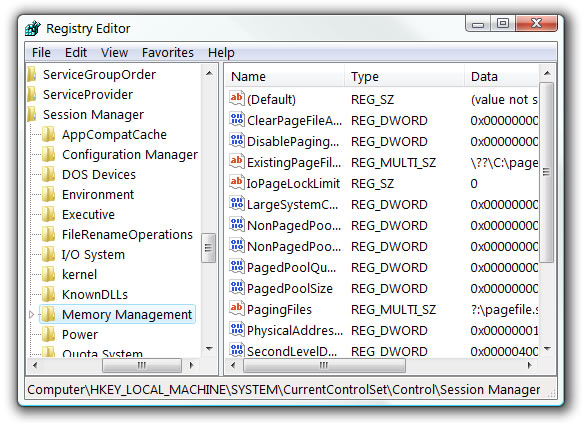
There are several relevant components to the Windows memory subsystem. In this guide we will put special emphasis on the hard drive, processor and RAM, taking you through a variety of settings to optimally configure these and hopefully end up with an overall smoother running system. Note: Most of the information and setting modifications covered here will require Administrative privileges. Troubleshooting For starters, it's always good practice making sure you have the latest Vista updates installed. For the purpose of this guide this is important as in many instances they may fix memory related issues, e.g. memory leaks, not releasing memory, etc. You can find and download relevant Vista updates using the built-in Windows Update, while hardware driver updates can be found at TechSpot Drivers. For application-specific updates check the developer/application site or use any built-in auto-update facility. Registry Options The System Registry contains several settings which will allow to further configure memory management features in Windows Vista. Used properly this can further improve your PC's memory subsystem performance - there are also several placebos we need to clear up as well. To access the Registry click on Start, Run. Type in regedit and click Ok. Navigate to [HKEY_LOCAL_MACHINE\SYSTEM\CurrentControlSet\Control\SessionManager\Memory Management].
The options we are interested in are in the right hand pane. The more relevant options are as follows: ClearPageFileAtShutdown. (Hexadecimal or Decimal). This setting allows inactive Pages in the Paging File to be cleared (overwritten with zeros) during shutdown. This is certainly worth considering if you're highly security conscious.
DisablePagingExecutive. (Hexadecimal or Decimal). This setting controls how inactive kernel-mode drivers and system code are handled by the memory subsystem.
It's worth considering that any performance benefit to this feature will only occur when restoring a process which had been paged out to the Page File. As such I would generally recommend setting this to 0, but if RAM availability is not an issue then a value of 1 may provide improved responsiveness when restoring applications that has been inactive for some time. LargeSystemCache. (Hexadecimal or Decimal). This setting controls the size of the file system cache.
Edited by skyR - 15 Jan 2008 at 1:29pm |
||||
 |
||||
|
Dog Lover
Senior Member

Joined: 17 Nov 2007 Online Status: Offline Posts: 653 |
Quote Reply
Posted: 27 Nov 2007 at 7:18pm |
|||
|
Posts like this are amazing and forever helpful.
Is there a way you can make it a stickey at the top of this catagory so later we do not have to go hunting for it?
|
||||
|
||||
|
Kelly
Senior Member
Digital Storm Customer Service
Joined: 13 May 2008 Online Status: Offline Posts: 791 |
Quote Reply
Posted: 27 Nov 2007 at 7:24pm |
|||
|
Thank you :)
And yes, I think I can arrange a sticky.
|
||||
|
||||
|
Kelly
Senior Member
Digital Storm Customer Service
Joined: 13 May 2008 Online Status: Offline Posts: 791 |
Quote Reply
Posted: 27 Nov 2007 at 7:25pm |
|||
|
actually it is a sticky. There's just a lot of them :)
|
||||
|
||||
|
Dog Lover
Senior Member
Joined: 17 Nov 2007 Online Status: Offline Posts: 653 |
Quote Reply
Posted: 27 Nov 2007 at 7:28pm |
|||
|
actually, I am an idiot then.
Thanks, Kelly
|
||||
|
||||
|
Post Reply
|
| Forum Jump | Forum Permissions You cannot post new topics in this forum You cannot reply to topics in this forum You cannot delete your posts in this forum You cannot edit your posts in this forum You cannot create polls in this forum You cannot vote in polls in this forum |

About Digital Storm
Contact Information
Facility Tour
Financing
Buy Now, Pay Later
Downloads
GSA Schedule
Terms & Conditions
Privacy Policy
Request Help
Call: 1-866-817-8676
(Hours 9AM-5PM PST)





 Topic Options